Tag: remove

  • Google Earth – Another instance of this application is already running

    Being unable to launch Google Earth Pro because it thinks it is already running seems to be happening frequently for me. I am using the Flatpak version if it matters.

    Despite killing the application there is still a lock file lingering preventing Google Earth Pro to launch. The error message is specifically:

    Google Earth
    Another instance of this application is already running.
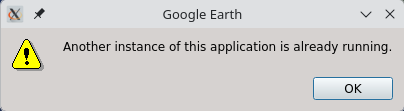
    To launch Google Earth again you need to delete this stale lock file which is inside your user directory:

    rm -v $HOME/.var/app/com.google.EarthPro/.googleearth/instance-running-lock

    Once gone Google Earth Pro will run again without complaining.

  • Remove white border on images in WP

    When posting last time I realised my example images had a little white border around them. For other occasions it may have been nice but this time I needed it without any borders.

    Another example below, left with white border and right with no border:

    test image test image

    To remove that automatically added border when you submit your post using WordPress do the following:

    1. Open your post for editing.
    2. Click on the image in question and select the Edit Image option.
    3. Click on the Advanced Settings tab on the top.
    4. Insert a 0 (zero digit) in the Border field under Image Properties.
    5. Save.

    Pretty simple stuff but thought I would share it in case someone else was looking for a remedy.

  • Empty Trash from the terminal

    For some reason I can not recall I went into my Trash bin on Fedora. There was unsurprisingly a lot of trash!

    I decided to empty the Trash bin but it only succeeded partially. I had a DVD directory that did not want to be deleted. Looking closer at the message it was a permissions error. Not sure how though, since if I did not have permissions to delete the directory from the Trash bin, how on Earth could I have moved it into the Trash bin to start with…!

    Looking around my home directory in the terminal I could not locate the exact spot to manually remove the directory. As always Google came to assistance and brought up a nice forum topic about how to empty the Trash bin in Fedora from the terminal.

    The simplest way would be to run the following command as root:

    rm -rf  ~/.local/share/Trash/files/*